Watch Free Live TV Channels Online (2026 Guide)
How to watch free live TV channels online in your browser — 11,000+ channels from 170 countries, no app, no signup, and how to tell a legal source from a pirate one.

Free live TV online used to mean shady sites full of pop-ups. It does not any more. Hundreds of broadcasters now publish their own channels as open streams, and anyone can watch them in a browser — no app, no account, no payment.
This guide explains where those streams come from, how to watch them, and how to spot the difference between an official free channel and a pirated one.
What "free live TV" actually means
There are three kinds of free live channels on the internet, and only two of them are safe to use.
- FAST channels — "free ad-supported streaming TV". Broadcasters and studios run 24-hour channels paid for by ads, the same way ordinary TV works. News, movies, music and old series.
- Public broadcasters — state or public-funded channels that stream themselves worldwide: news and cultural channels from Europe, Asia, Africa and the Americas.
- Pirated feeds — someone's paid subscription re-streamed without permission. These are illegal, they break every few hours, and they are the reason free TV has a bad name.
The first two are what you want. They are published by the channel owner, they stay online, and nobody has to hide anything.
How to watch, step by step
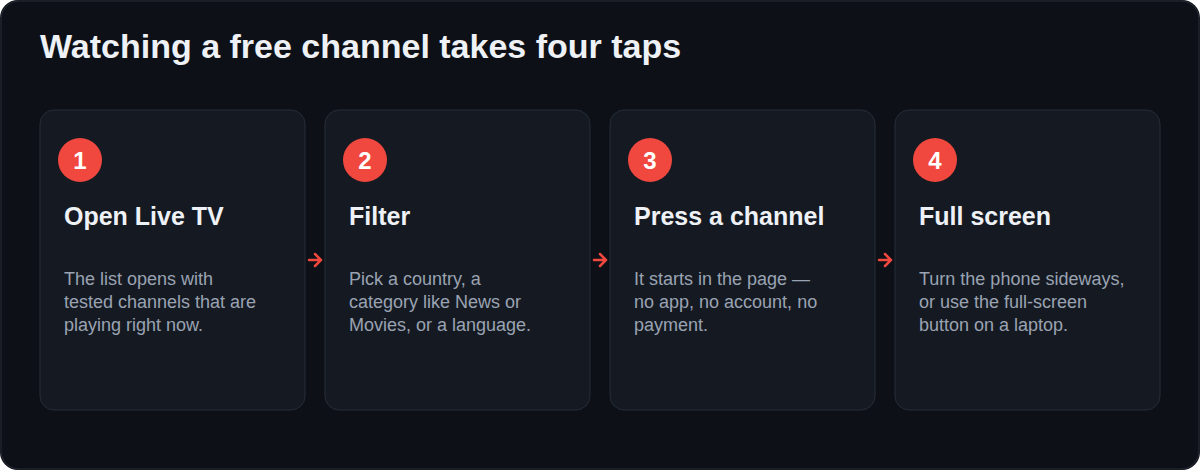
- Open the Live TV section. The list starts with channels that have been tested and are playing right now.
- Narrow it down with the filters: country, category (News, Movies, Sports, Music, Kids) and language.
- Press a channel. It plays in the page — most streams start in a second or two.
- If a channel is slow on your connection, try another one from the same country; several broadcasters publish more than one quality.
Nothing is installed, and nothing is stored on your device.
Which channels are worth starting with
- News: the big international news channels stream free in English, Arabic, Spanish, French, German and Hindi.
- Movies: FAST channels run classic films around the clock, usually by theme — westerns, horror, comedy.
- Music: hit-music and regional-music channels, good as background while working.
- Kids: cartoon channels that are free by design, with no account needed.
- Local: regional channels from your own state or city, which are often impossible to find on cable outside that area.
What is on right now
A channel list is only half the story. A TV guide tells you what is actually playing. On Teleora, channels that have a guide show the current programme under their name, and searching for a show — say KBC — lists the channels airing it, in your own time zone. That is the fastest way to find something worth watching instead of flicking through a wall of logos.
Watching on a phone or TV
- Phone: the same page works; the player fills the screen when you turn the phone sideways.
- Laptop: press the full-screen button, or use the "Open in VLC" option if you prefer a desktop player.
- Smart TV: most TV browsers can open the site, but a laptop connected by HDMI is usually smoother.
How to tell a legal free channel from a pirated one
Ask three simple questions:
- Who publishes it? An official channel comes from the broadcaster's own servers or their app's public feed. If a site is streaming a pay-TV channel that normally costs money, someone is stealing it.
- Does the site hide? Legal sites name their sources and have a takedown address. Pirate sites hide behind pop-ups and mirror domains.
- Does it ask for strange things? No legal channel needs you to install a player, disable your antivirus, or "verify" with a card.
Teleora only lists open streams published by the channels themselves, shows where each stream comes from, and removes anything a rights holder asks about.

What people actually watch
Across a free channel list, viewing is not spread evenly. News and movie channels take most of the time, followed by music and kids.
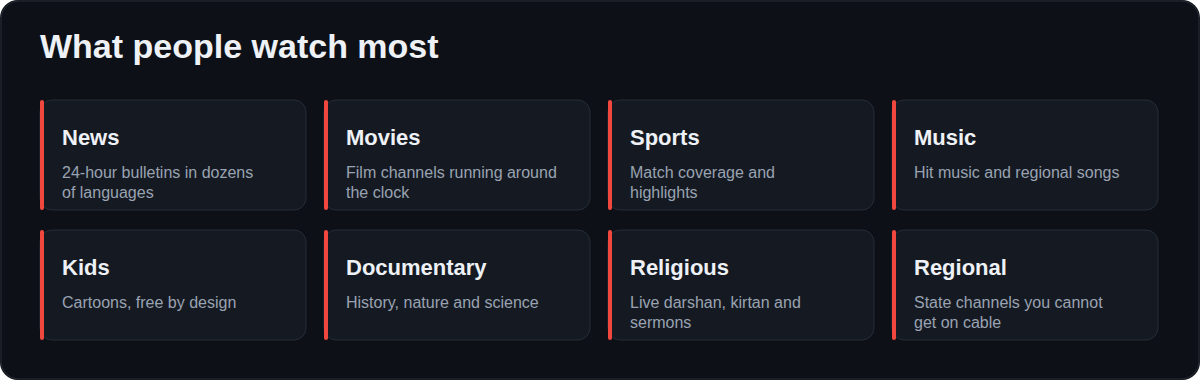
A pattern worth knowing: people arrive for a big news event, then stay for a film channel. That is why a good free list keeps both close together.
Quality, buffering and what actually causes it
A stream stalling is usually not your internet. Three things cause most problems:
| What you see | Usual cause | What to do |
|---|---|---|
| Two seconds of black, then it plays | Normal buffering | Wait; live streams always start with a buffer |
| Plays, freezes every 20 seconds | The channel's server is overloaded | Switch to another channel from the same country |
| Never starts, spinner forever | Stream moved or is blocked in your country | Pick a different channel; the list marks tested ones |
| Sound but no picture | Codec your browser does not support | Try another browser, or open the stream in VLC |
Channels that have been tested and are playing are listed first, so the fastest fix is almost always to take the next one down.
Live TV compared with other free viewing
| Live TV | Free movies | Radio | |
|---|---|---|---|
| What it is | Scheduled channels, always on | Complete films on demand | Audio stations, always on |
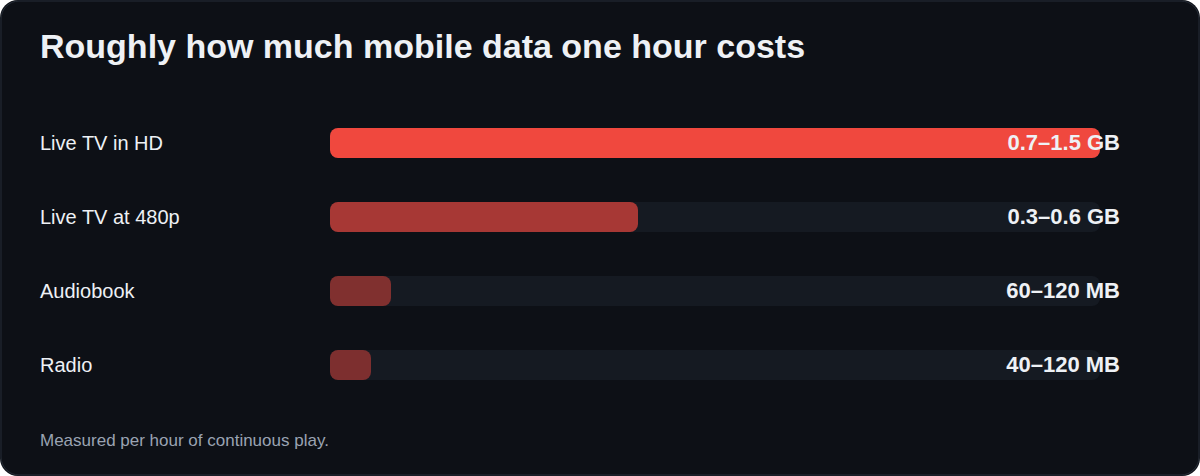
| Data per hour | 0.7–1.5 GB in HD | 0.7–1.5 GB in HD | 40–120 MB |
| Best for | News, sport, background | An evening | Work, travel, weak connections |
| Works offline | No | No | No |
Making it feel like a TV
- Add the site to your home screen — it opens full screen with its own icon, like an app.
- Use a laptop with HDMI for a real television; TV browsers are usually slower than the laptop you already own.
- Keep two tabs: one channel, one guide, so you can check what is next without losing the picture.
- Cast carefully — browser casting works for many streams but not all, because some servers refuse a second connection.
FAQ
Is it legal to watch free live TV channels online?
Yes, when the channel itself publishes the stream. Broadcasters put out free channels to reach viewers and earn from ads. Watching a pirated re-stream of a paid channel is not legal, which is why it matters who publishes the feed.
Do I need to sign up or install an app?
No. Open streams play straight in a browser. There is no account, no download and no payment.
Why do some channels not load?
Streams move or go down for maintenance, and a few are blocked outside their own country. Teleora tests channels and shows the ones that are playing first, so pick another from the same list if one fails.
Can I watch on my phone using mobile data?
Yes. Live TV uses roughly 0.7–1.5 GB per hour in HD, less on a small screen, so watch your data plan.
How many channels are there?
Teleora lists more than 11,000 channels from about 170 countries, and nearly 6,000 of them have been tested as playing in a browser.
Do free live TV channels have ads?
Most do, because ads are what pays for a free channel. That is exactly why the broadcaster is happy for you to watch: the ads are theirs.
Can I record a live channel?
Not on the site, and recording a broadcast can break the broadcaster’s terms. Many channels publish their programmes again on demand.
Which browser works best?
Any current Chrome, Firefox, Safari or Edge. If a stream refuses to start in one browser, trying another often fixes it because of codec support.


